Queuepid
Language :EN
Join the DiscordDiscord

The beta is open

Install the app. Get in the queue.

iPhone or Android, three steps, five minutes. The queue is open: install the app and start swiping right away.

On iPhone

  1. Install TestFlight

    Apple's app for beta versions. Free, on the App Store, and you only open it once.

  2. Open the beta link

    It opens in TestFlight. Tap “Accept”, then “Install”.

  3. Open Queuepid and build your profile

    Photos, your games, what you are looking for. The queue is open: your profile joins it as soon as it is ready.

    The queue is open

TestFlight shows version 1.0.0. Updates arrive on their own, nothing to do.
On Android

With the Google account of your phone.

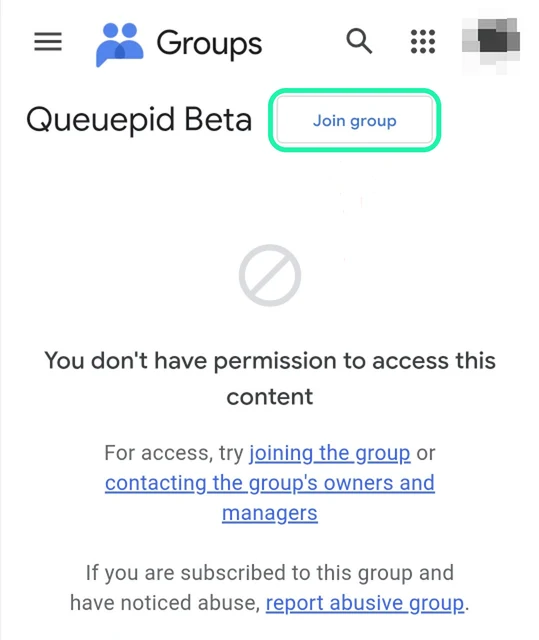
  1. Open the testers group

    On the group page, tap “Join group” at the top.

    Open the group
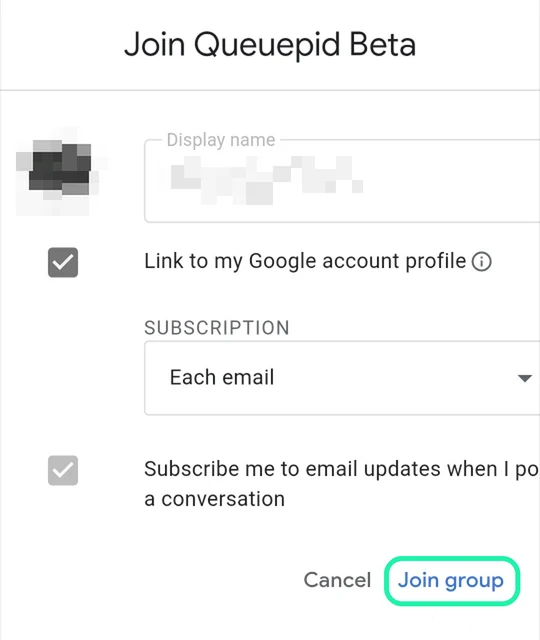
    The Queuepid group on Google Groups, with the Join group button circled
  2. Confirm

    A window opens. Change nothing and tap “Join group” at the bottom right. You're in the group.

    The confirmation window, with the Join group button circled
  3. Become a tester

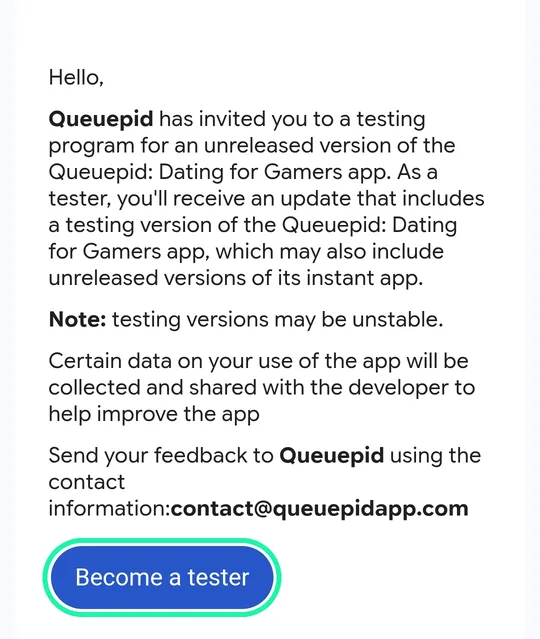
    Come back to this page and open the Play test page. Tap “Become a tester”. Only after joining the group, otherwise Play says the app can't be found.

    Open the test page
    The Queuepid test invitation on Google Play, with the Become a tester button circled
  4. Install Queuepid

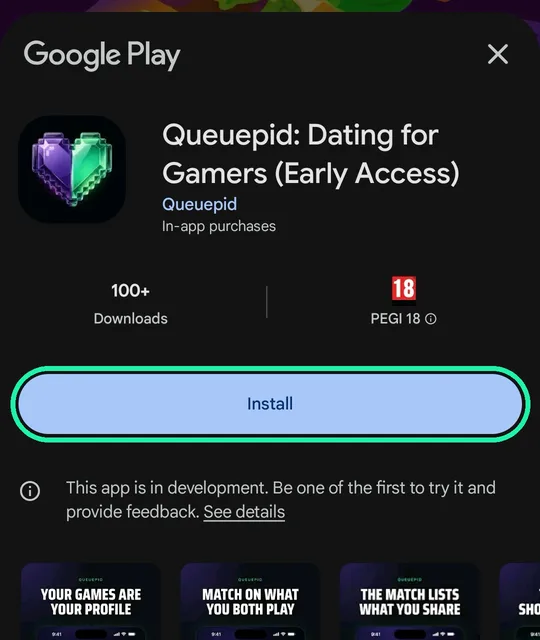
    Open the Play Store listing, named “Queuepid: Dating for Gamers (Early Access)”. Tap “Install”, then open the app and build your profile.

    Open the Play Store

    If Play says the app is not available, the group has not caught up yet: wait a minute and open the link again.

    The Queuepid listing on the Play Store, with the Install button circled

These screens are in English. Google shows them in your account's language: the buttons change names, not places.

Stuck? Every problem and its fix

Stuck?

Android: every blocker, and how to clear it.

Google Play's closed testing refuses without ever saying why. Here is what we have seen since we opened, and what actually unblocked people, in the order to try. Almost everyone is through on the first or second move.

The golden rule

One Google account, from start to finish: the one that joins the group, the one that taps “Become a tester” and the one signed in to the Play Store have to be the same. Almost every blocker comes from this.

  1. The satellite, “Item not found” or “This item isn't available”

    Why

    Google Play has not recognised you as a tester on this phone yet. It is blocker number one, and it always gives in eventually. The moves below go from quickest to most drastic: stop as soon as the app shows up.

    What to do

    1. Open the Play Store, tap your avatar top right and read the Gmail address: that is the one that has to have joined the group and tapped “Become a tester”.
    2. Close the Play Store from the recent apps (a swipe up, not “Force stop”), then open the Queuepid listing again.
    3. Give Google time: 15 minutes to an hour often pass before the app shows up. Plenty of people are unblocked by the wait alone.
    4. Settings → Apps → Google Play Store → Storage → “Clear cache”, then “Clear data”. Do the same for “Google Play services”.
    5. Restart the phone, then open the listing again.
    6. If you are on a VPN, turn it off and try again.
    7. Remove your Google account from the phone (Settings → Accounts), add it back, restart and try again.
    8. Go through a computer: open the Queuepid listing with the same Google account and use “Install on more devices”. The install lands on your phone by itself.
    9. Check your age with Google (support.google.com/accounts/answer/10071085): Queuepid is 18 and over, and an account whose age is not proven can stay locked out.

    Clearing the cache is not always enough: “Clear data” is what unblocked the most stubborn cases. You lose none of your apps, purchases or passwords.

  2. Play Store search does not find Queuepid

    Why

    An app in closed testing shows up in no search result at all, even for a tester. It only exists through its direct link.

    What to do

    1. Do not search the Play Store: the listing only opens through its direct link, the button below.
    2. Once installed, Queuepid sits on your home screen and in your app list like any other.

    The right screen is titled “Queuepid: Dating for Gamers (early access)” with a green “You're a tester” banner.

  3. The group says “You do not have permission to view this group's content”

    Why

    That is normal, and it is even a good sign. The group only exists to hold the tester list: its messages are for managers.

    What to do

    1. If you tapped “Join group” and confirmed, you are in.
    2. Move on to the next step: the “Become a tester” link.
    3. If in doubt, open the group link again: if the “Join” button is gone, you are a member.

    The group sends no email and does nothing else than open the door to the test.

  4. The “Join group” button is nowhere to be seen

    Why

    The page is open without being signed in, or with a work, school or Family Link account, which is not allowed to join an outside group.

    What to do

    1. Open the link in Chrome, on the phone, signed in with the Play Store account.
    2. If the page stays empty or refuses, it is a managed account: use a personal Gmail account instead.
    3. Join the group with that account, then open the Play Store with it.

    Google shows this page in the language of the account: the button may be called “Join group” or “Dołącz do grupy”.

  5. The download starts but the install fails

    Why

    You are a tester and the listing opens: it is the Play Store tripping over its own cache or over Google Play services.

    What to do

    1. Tap “Install” a second time: it often goes through on the second try.
    2. Settings → Apps → Google Play Store → Storage → “Clear cache”, then “Clear data”. Same for “Google Play services”.
    3. Restart the phone and start the install again.
    4. Check you still have free space on the phone.

    A VPN left on during the download is enough to fail the install: turn it off while it installs.

  6. “Your device isn't compatible”

    Why

    Queuepid needs Android 7 or later, and a Play Store that is up to date.

    What to do

    1. Settings → About phone: read the Android version.
    2. On Android 7 or later, update the Play Store: its menu → Settings → About → “Update Play Store”.
    3. Restart the phone, then open the listing again.

    Android tablets work too. Phones without Google services, like recent Huawei models, cannot install the beta.

  7. You installed an APK file found somewhere else

    Why

    The app opens, then refuses to sign you in: an install that does not come from the Play Store is stopped at the door, and that is not something we can fix device by device.

    What to do

    1. Uninstall that version.
    2. Do the two steps again in order, with the buttons below: the group, then “Become a tester”.
    3. Install Queuepid from the Play Store.

    It is the same protection that guards everyone's account and photos: we would rather leave it standing.

Still stuck?

Write to us, we unblock it by hand. Send the Gmail address used on the phone: we check the tester list live. Add the phone model and a screenshot of what Play shows, and we answer in one go.

The calendar

Everyone gets into the queue at the same time.

The beta opens in two steps. First your profile and your games. Then, three days later, the queue opens for everyone at the same second, full from the very first swipe.

Next up:On the App Store

00d:00h:00min:00s

In review with Apple.

Paris time

Gold free for everyone

  1. 6:00 pm

    The beta opens

    iOS and Android. You build your profile, add your games, set your filters. The queue is still closed, and everyone already has Gold.

  2. 6:00 pm

    The queue opens

    For everyone at the same second. Hundreds of profiles from the first swipe, not an empty queue.

  3. Soon

    On the App Store

    In review with Apple. We email you the day it lands, and free Gold runs until then. Android follows in early October.

Rather wait for the stores?

Leave your email: we'll let you know on release day, on the App Store as soon as Apple approves the app, and in early October on Google Play.

One email when each store goes live, nothing else. We never pass your address on.

Once installed

Three things to know

We're listening

Queuepid is built with you.

Every report and every idea comes straight to us, and a human reads it. The beta is when the app changes the most: tell us what is broken and what is missing.

A bug

Something broken? Say it.

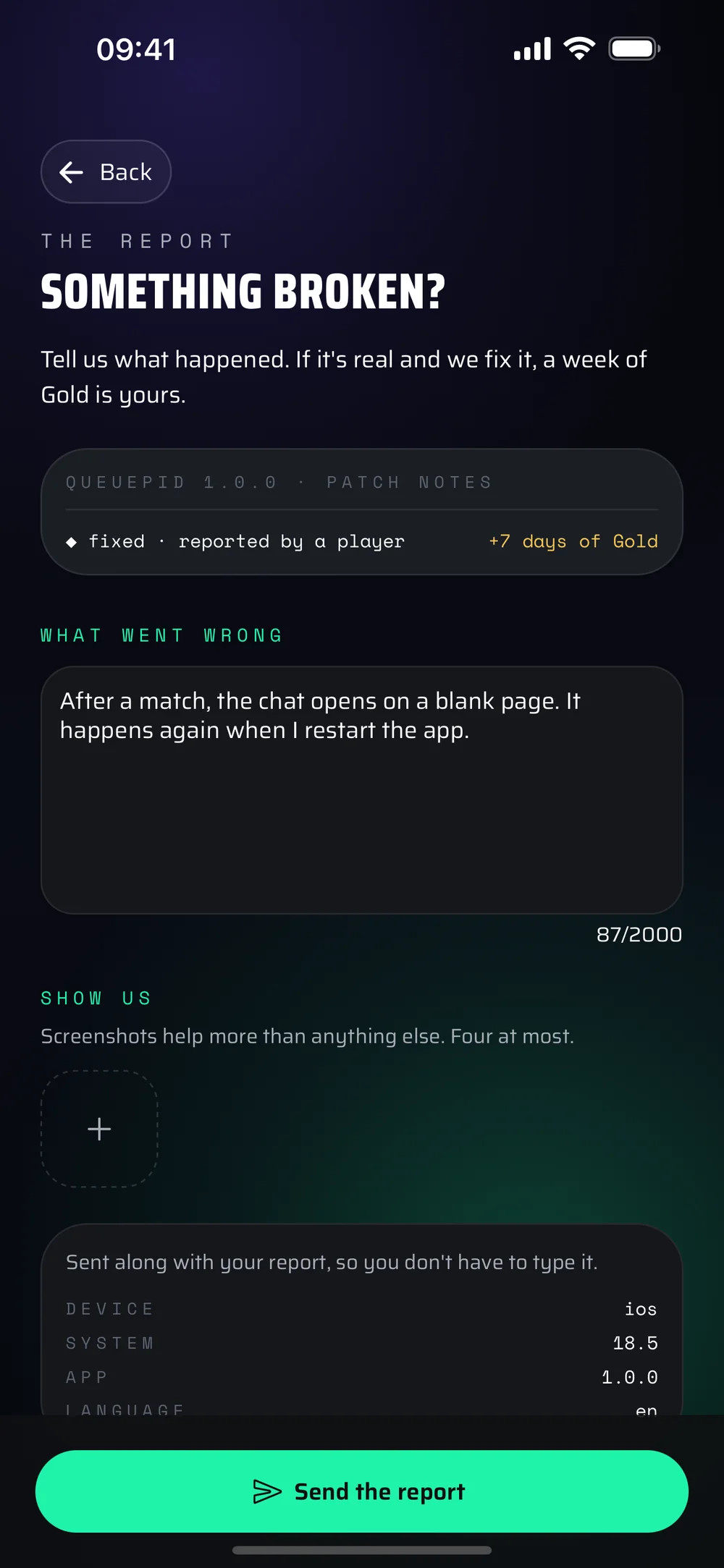
Tell us what you were doing and what happened, and add a screenshot if you can. Your phone's details are attached to the report, so there is nothing to look up.

  1. Profile
  2. Settings
  3. Report a bug

+7 days of Gold per fixed bug, after the beta

The app's bug report screen, with a bug described in the text field

An idea

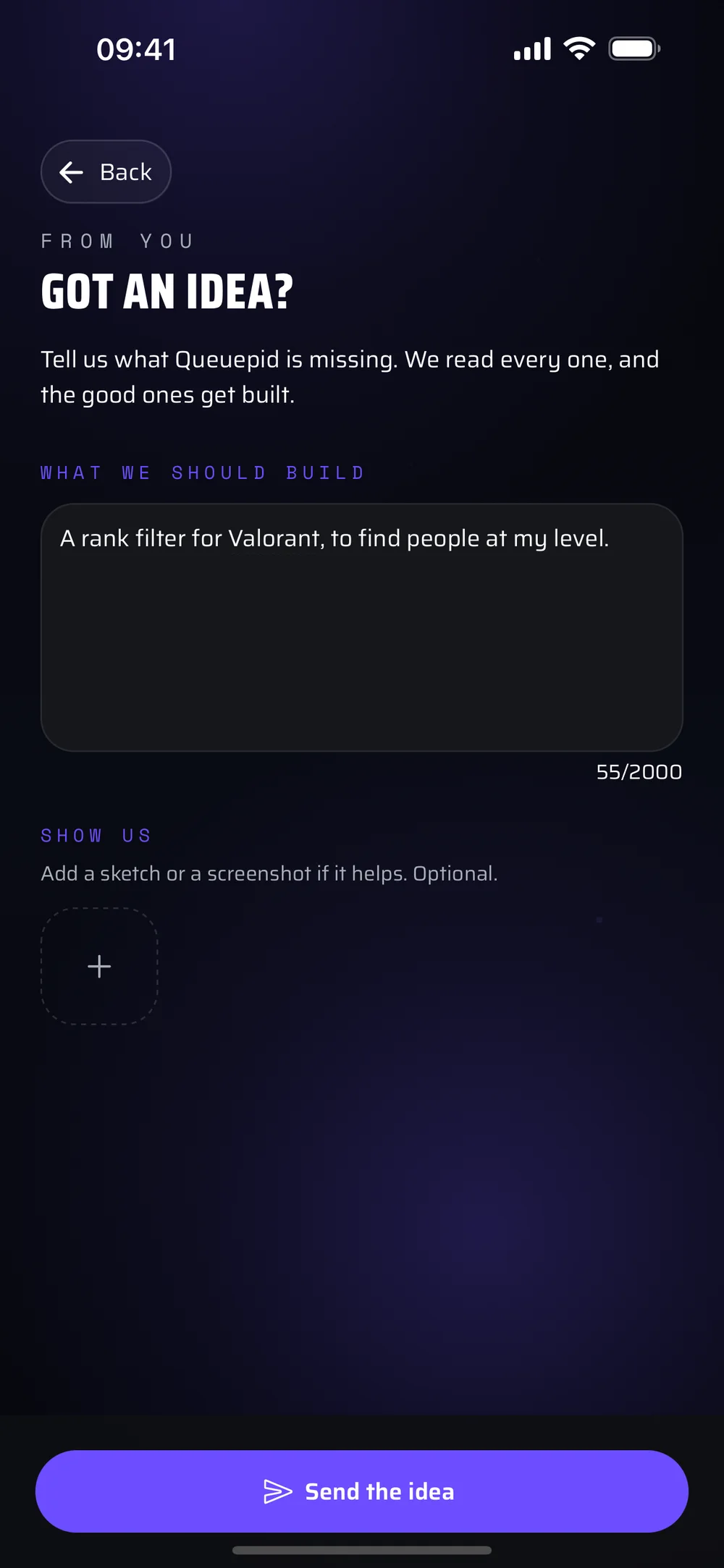
Something missing?

A filter, a mode, a detail that bugs you every day: write it down. We read everything, and the good ideas end up in the app.

  1. Profile
  2. Settings
  3. Suggest an idea

Ideas are also voted on in the Discord

The app's idea screen, with an idea for a rank filter written in the text field

The more we are, the better it matches

Invite your friends.

The queue fills up with everyone who arrives this week. Send them the link: the page shows them the right path for their phone.

queuepidapp.com/beta

Questions

What testers ask us.

Google Play says the app cannot be found.

You opened the Play link before joining the group, or with a different Google account than the phone's. Join the group with the phone's account, wait a minute, then open the link again.

TestFlight asks me for an invitation code.

No code needed: open the beta link on your iPhone once TestFlight is installed. It opens straight in TestFlight.

I cannot see anyone in the queue.

The queue has been open since Friday 18 September: everyone got in at the same second. If it looks empty, widen your distance, age or intention filters.

Is my phone compatible?

You need iOS 15.1 or later on iPhone and iPad, or Android 7 or later.

Do I keep my profile when the app hits the stores?

Yes, it is the same account: on release day the App Store version replaces the beta on your iPhone, and Google Play does the same in early October. Your photos, games and matches stay.

Do I pay anything for the free Gold?

Nothing. No card to enter, nothing to cancel. It is on for everyone until the App Store release, then the free version takes over and you keep everything you did.

Can I invite my friends?

Yes, and that is what fills the queue. Send them the link to this page: it shows them the right path for their phone.

The beta is open

Get in the queue now.

Install the beta on iPhone or Android: the queue is open, you swipe as soon as your profile is ready. And the Discord is where the players meet.